How To Get More Engagement On YouTube In 2026

Engagement is the currency of YouTube. Views alone don't grow a channel — comments, likes, shares, and saves do. The algorithm in 2026 rewards videos that spark interaction, not just passive watching.
Here's a practical guide to get more engagement on every video you post, based on what's actually working right now.
Why Does YouTube Engagement Matter More Than Views In 2026?
YouTube's algorithm now tracks how people interact, not just how many watch — a video with fewer views but more comments will outperform in recommendations.
YouTube's algorithm has shifted. In 2026, it doesn't just track how many people watch — it tracks how people interact. A video with 10,000 views and 500 comments will outperform a video with 50,000 views and 20 comments in the recommendation system.
Engagement signals include:
- Comments: The strongest engagement signal. A comment takes effort, which tells YouTube the video provoked a reaction.
- Likes: Quick positive signal. High like ratios boost recommendation confidence.
- Shares: When someone shares your video, YouTube treats it as a strong endorsement.
- Saves: The "Save to playlist" action signals long-term value.
- Replies to comments: Back-and-forth conversations signal community, which YouTube heavily rewards.
Think of engagement as a multiplier on your views. More engagement = more distribution = more growth.
How Do You Start Conversations With Your YouTube Audience?
Ask specific questions, share controversial opinions, leave something incomplete, and ask for personal experiences — give viewers a concrete reason to comment.
The biggest engagement mistake creators make is treating YouTube like a broadcast. They talk at viewers instead of with them.
To get comments, you need to give people a reason to comment. Here's how:
- Ask a specific question: Not "What do you think?" but "Which of these 3 strategies would you try first? Drop a 1, 2, or 3 in the comments."
- Share a controversial opinion: Politely taking a stance on a debatable topic within your niche naturally sparks discussion.
- Leave something incomplete: "I didn't include X because... let me know if you want a dedicated video on that."
- Ask for personal experiences: "Has this ever happened to you?" makes viewers want to share their own stories.
Why Is The First Hour After Publishing Critical For YouTube Engagement?
YouTube judges engagement velocity — how quickly your video gets interaction — and the first hour sets the tone for how the algorithm distributes your video.
YouTube judges engagement velocity — how quickly your video gets interaction after publishing. The first hour sets the tone for the algorithm.
To maximize early engagement:
- Publish when your audience is online: Check YouTube Studio > Analytics > Audience tab to see when your viewers are most active.
- Reply to every comment in the first hour: This doubles your comment count (your reply counts too) and encourages more people to join the conversation.
- Pin a comment with a question: Pin your own comment asking a question related to the video. It's the first thing viewers see and prompts them to respond.
- Share immediately on community tab: A community post announcing your new video drives your most engaged subscribers to watch and comment first.
How Can You Use Comments To Create YouTube Engagement Loops?
Analyze which topics generate the most discussion, what emotional triggers drive replies, and whether your CTAs work — then replicate those triggers in every video.
Your existing comments are a blueprint for what drives interaction on your channel. But most creators never analyze them beyond reading a few.
TubeFeedback lets you analyze your comment sections with AI to find patterns:
- Which topics generate the most discussion
- What questions viewers keep asking (= future video ideas that will get comments)
- What emotional triggers drive the most replies
- Whether your CTAs are actually working
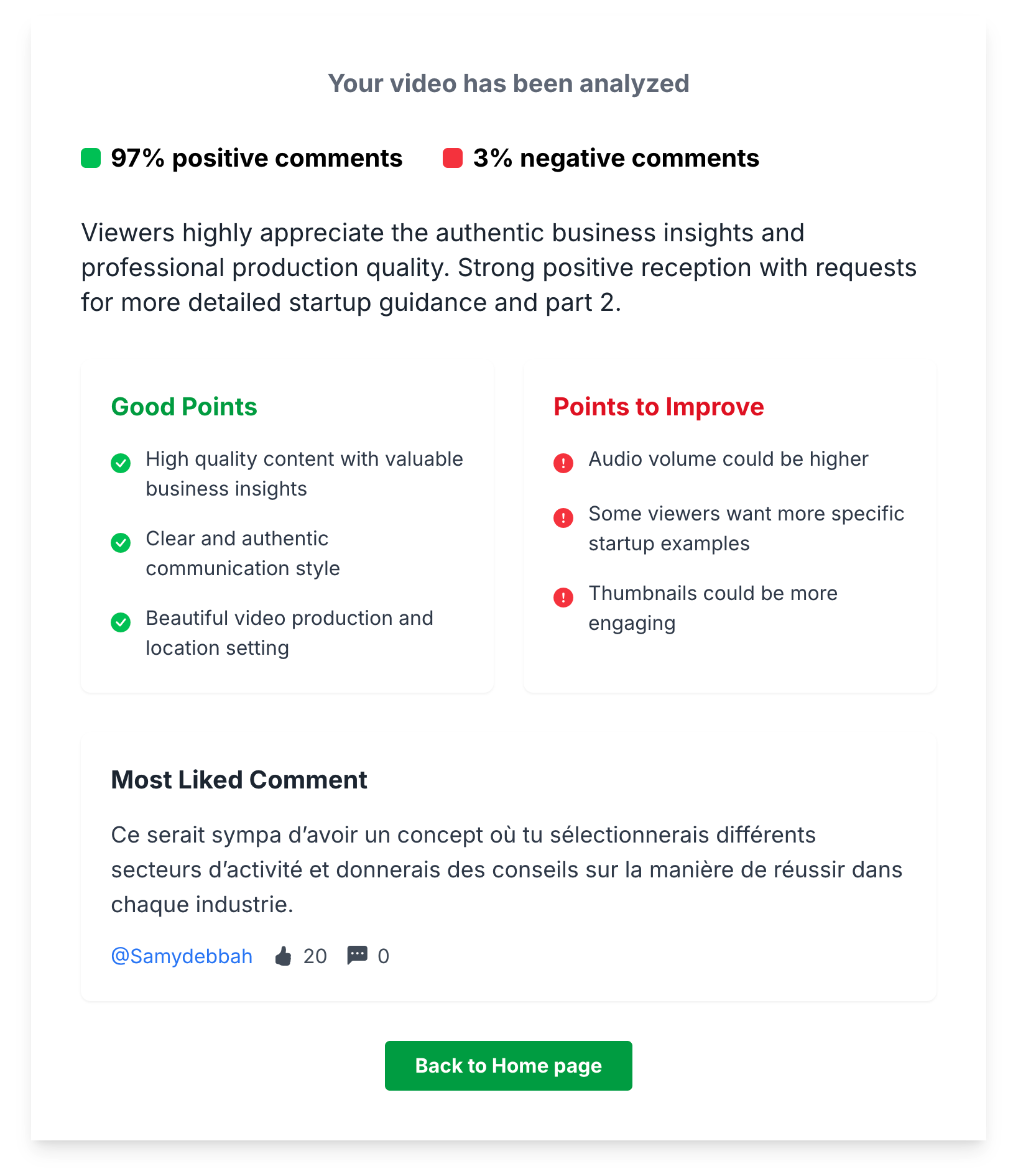
Once you know what makes your audience engage, you can replicate those triggers in every video. That's an engagement loop: comments inform content, content generates more comments.
How Can YouTube Community Posts Boost Your Engagement?
Polls, behind-the-scenes photos, AMAs, milestone celebrations, and content teasers posted 2-3 times per week keep your channel active between uploads.
Community posts are one of the most underused features on YouTube. They show up in subscribers' feeds and cost nothing to create.
High-engagement community post formats:
- Polls: "What should my next video be about?" — easy to interact with, high response rate.
- Behind-the-scenes photos: Makes subscribers feel like insiders.
- Ask me anything: Simple text post inviting questions. Creates a burst of engagement.
- Celebrate milestones: "We just hit 10K subs! What video brought you here?" — triggers nostalgia and comments.
- Tease upcoming content: Builds anticipation and gives early commenters a sense of involvement.
Post 2-3 times per week between uploads. It keeps your channel active and your audience engaged even when you're not uploading videos.
How Do You Make YouTube Videos More Shareable?
Create "I need to send this to someone" moments, make content quotable, solve common problems clearly, and use timestamps in descriptions.
Shares are powerful but hard to earn. People share videos that make them look good, feel something, or help someone they know.
To make your videos more shareable:
- Create "I need to send this to someone" moments: Relatable frustrations, "aha" insights, or useful tips that viewers associate with someone specific.
- Make your content quotable: Clear, punchy statements that viewers want to repeat. "Stop chasing views, start chasing comments" is more shareable than a paragraph of explanation.
- Solve a common problem clearly: "How to fix X" videos get shared because they're genuinely useful.
- Use timestamps in descriptions: People share specific sections of videos more than entire videos.
What Is The Best Strategy For Replying To YouTube Comments?
Ask follow-up questions instead of just "Thanks!", heart comments strategically, feature viewer comments in videos, and ignore trolls.
Replying to comments boosts engagement, but how you reply matters as much as whether you do.
- Ask follow-up questions: Instead of "Thanks!", try "Thanks! What was the most useful part for you?" — this keeps the conversation going.
- Heart comments strategically: Heart the comments that represent the behavior you want to encourage (detailed feedback, questions, topic suggestions).
- Feature viewer comments in videos: "Last week, @username asked..." validates commenters and motivates others to participate.
- Don't feed trolls: Reply to constructive criticism, ignore pure negativity. Your reply ratio should favor genuine interactions.
How Can You Learn From Your Competitors' YouTube Engagement?
Use TubeFeedback to analyze any public video's comments — see what topics drove discussion, what viewers request, and what emotional triggers work.
Your competitors' most-commented videos reveal what your shared audience cares about and engages with.
With TubeFeedback, you can analyze any public video's comments — not just your own. Paste a competitor's high-engagement video link and instantly see:
- What topics drove the most comments
- What viewers are requesting but not getting
- What emotional triggers generated the most discussion
Use these insights to create content that you already know will spark engagement.
What Are The Biggest YouTube Engagement Killers?
Generic CTAs, disabled comments, ignoring your comment section, uploading and disappearing, and making content only for the algorithm.
- "Like and subscribe" without context: Generic CTAs are ignored. Give a reason: "If this strategy saves you time, a like helps more people find it."
- Disabling comments: Unless absolutely necessary, never turn off comments. You're killing your strongest engagement signal.
- Ignoring your comment section: If you never reply, viewers stop commenting. It's a two-way street.
- Uploading and disappearing: Engagement needs nurturing, especially in the first 24 hours after publishing.
- Making content only for the algorithm: Viewers engage with authenticity. If your content feels calculated, they'll watch but won't interact.
Conclusion: Engagement Is Built, Not Bought
More engagement doesn't come from tricks or hacks. It comes from understanding what your audience cares about and creating content that invites them to participate.
Your action plan for 2026:
- Analyze your most-commented videos with TubeFeedback to find your engagement triggers.
- Ask specific questions in every video — give viewers a reason to comment.
- Reply to comments in the first hour after publishing.
- Use community posts 2-3 times per week to maintain momentum.
- Study your competitors' engagement to find proven topics and triggers.
Every comment, like, and share tells YouTube your content matters. Start building engagement today, and the algorithm will do the rest.
