YouTube comments are one of the most valuable sources of feedback for any creator. But let's be honest: scrolling through hundreds or thousands of comments is painful, slow, and easy to give up on.
In this guide, you'll learn practical methods to read and analyze your YouTube comments fast, so you can extract real insights without wasting hours.
Comments reveal patterns about what resonates, what confuses viewers, and what they want next — data no analytics dashboard can provide.
Most creators treat comments as a vanity metric: "Nice video!" feels good, but it doesn't help you improve. The real value lies in the patterns hidden in your comment section.
Comments can tell you:
The problem isn't the data, it's the volume. A video with 500 comments can't be analyzed manually in any reasonable time. That's why you need a system.
YouTube Studio lets you filter by response status, subscriber status, and search by keywords — useful for basic moderation but limited for trend analysis.
YouTube Studio lets you filter and sort comments, but it's limited. Here's what you can do:
This works for basic moderation, but it doesn't give you the big picture. You can't see trends, sentiment, or recurring themes. For that, you need more powerful tools.
AI tools like TubeFeedback analyze your entire comment section in seconds, surfacing sentiment, recurring topics, suggestions, and complaints automatically.
This is where things get interesting. Instead of reading every comment yourself, let AI do the heavy lifting.
TubeFeedback is a tool built specifically for this. Just paste your YouTube video link and get a full analysis of your comment section in seconds:
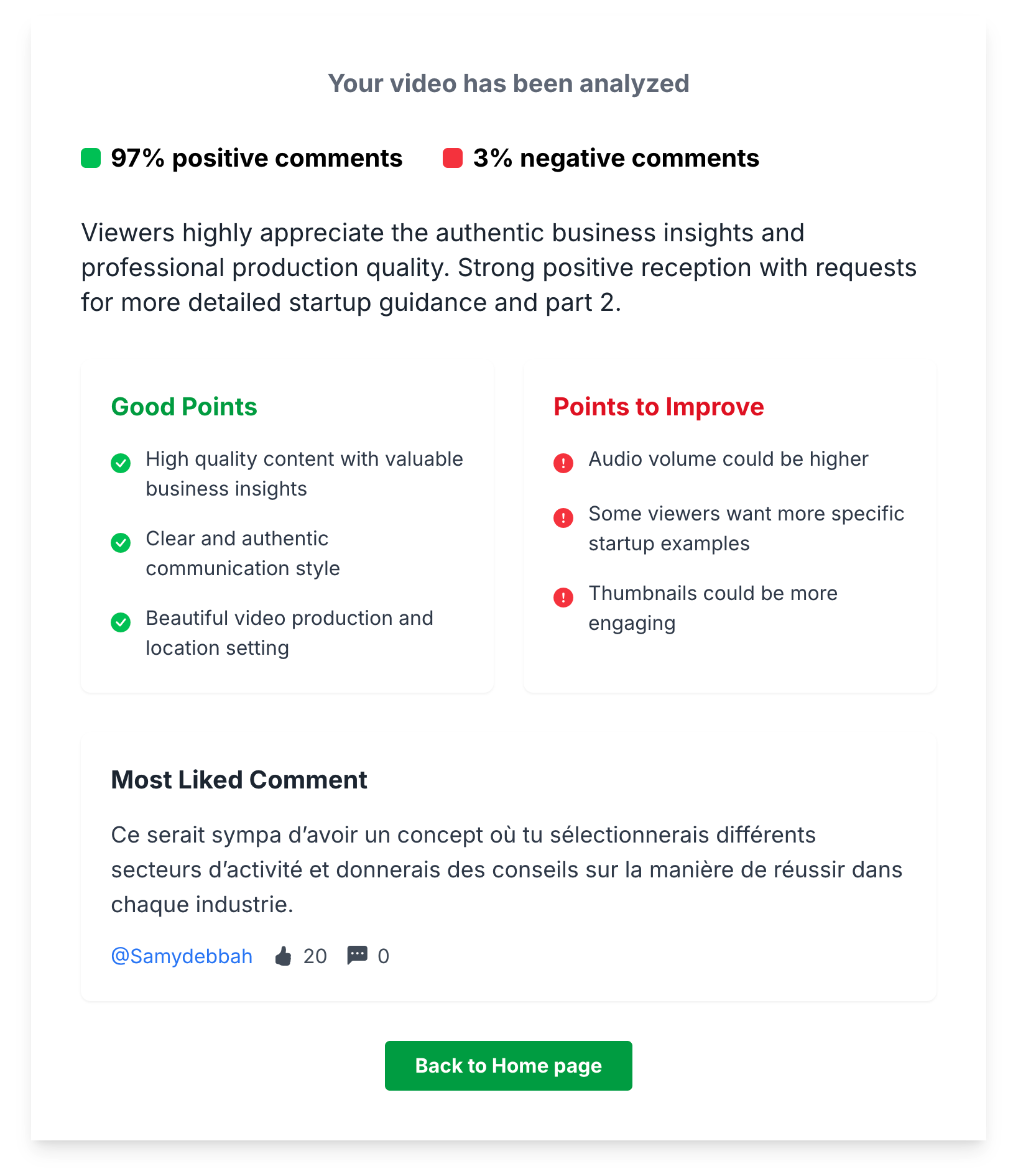
What used to take an hour of scrolling now takes one click. And the insights are structured, so you can act on them immediately.
Use Ctrl+F (or Cmd+F) in your browser to search within loaded comments, but note that YouTube loads comments in batches so you need to scroll first.
If you're looking for something specific, a manual keyword search can work. Use your browser's Ctrl+F (or Cmd+F) to search within the comment section on YouTube.
Useful searches include:
The downside: YouTube only loads comments in batches. You need to scroll down and wait for all comments to load first, which defeats the purpose of being fast. This method is a last resort.
Focus on repeated questions, emotional reactions, timestamps, direct suggestions, and comparisons to other creators — these are the signals that matter.
Whether you use AI tools or go manual, here's what actually matters:
Yes — competitor comment sections reveal what your shared audience wants and whether they're getting it, giving you a competitive edge.
Your own comments are just half the picture. Competitor comment sections reveal what your shared audience is looking for, and whether they're getting it.
Here's how to use this:
This gives you a competitive edge: you're not just guessing what to make, you're making content that addresses real, proven demand.
Run weekly analysis on your latest video, review monthly trends across videos, and adjust your content strategy quarterly based on accumulated feedback.
Insights mean nothing without action. Here's a simple workflow:
The creators who grow the fastest aren't the ones who post the most. They're the ones who listen the best.
Only reading top comments, taking one comment too seriously, ignoring short comments, and never replying are the most common errors creators make.
Your YouTube comment section is full of insights waiting to be discovered. You don't need to read every single comment — you need the right tools and the right approach.
Here's your quick action plan:
Stop scrolling endlessly. Start analyzing smartly. Your comments already hold the answers to growing your channel.
