How To Use AI For YouTube Growth (Tools That Actually Help) In 2026
AI tools are everywhere in 2026. Every week there's a new tool claiming to 10x your YouTube growth. But most of them are gimmicks — they generate generic content, automate the wrong things, or solve problems you don't actually have.
This guide cuts through the noise. Here are the AI tools and strategies that actually help YouTube creators grow, and the ones you should skip.
What Is The Problem With Most AI Tools For YouTube?
Most tools automate creation instead of analysis — AI-generated scripts, thumbnails, and voiceovers sound generic, while AI excels at analyzing data humans can't process at scale.
Before diving into what works, let's address what doesn't. Most AI tools for creators fall into the same trap: they automate creation instead of automating analysis.
AI-generated scripts sound generic. AI-generated thumbnails look generic. AI-generated voiceovers feel generic. Your audience can tell, and YouTube's algorithm can measure the engagement difference.
Where AI actually shines is in the boring, time-consuming work that humans do poorly at scale:
- Analyzing hundreds of comments to find patterns
- Researching keywords and trending topics
- Testing title and thumbnail variations
- Transcribing and repurposing content
- Understanding what your audience actually wants
The rule is simple: use AI to understand and optimize, not to replace your creative voice.
How Can AI Comment Analysis Help You Grow On YouTube?
AI tools like TubeFeedback analyze your entire comment section in seconds, surfacing sentiment, recurring topics, content requests, and complaints — telling you exactly what to make next.
Your comment section contains more growth insights than any analytics dashboard. But reading 500+ comments manually? Nobody has time for that.
TubeFeedback uses AI to analyze your entire comment section in seconds. Just paste a video link and get:
- Sentiment breakdown: Is the overall reaction positive, negative, or mixed?
- Topic clustering: What subjects do viewers bring up the most?
- Content requests: What are viewers explicitly asking you to make?
- Pain points: What frustrations or complaints keep coming up?
- Competitor insights: Analyze any public video's comments, not just your own.
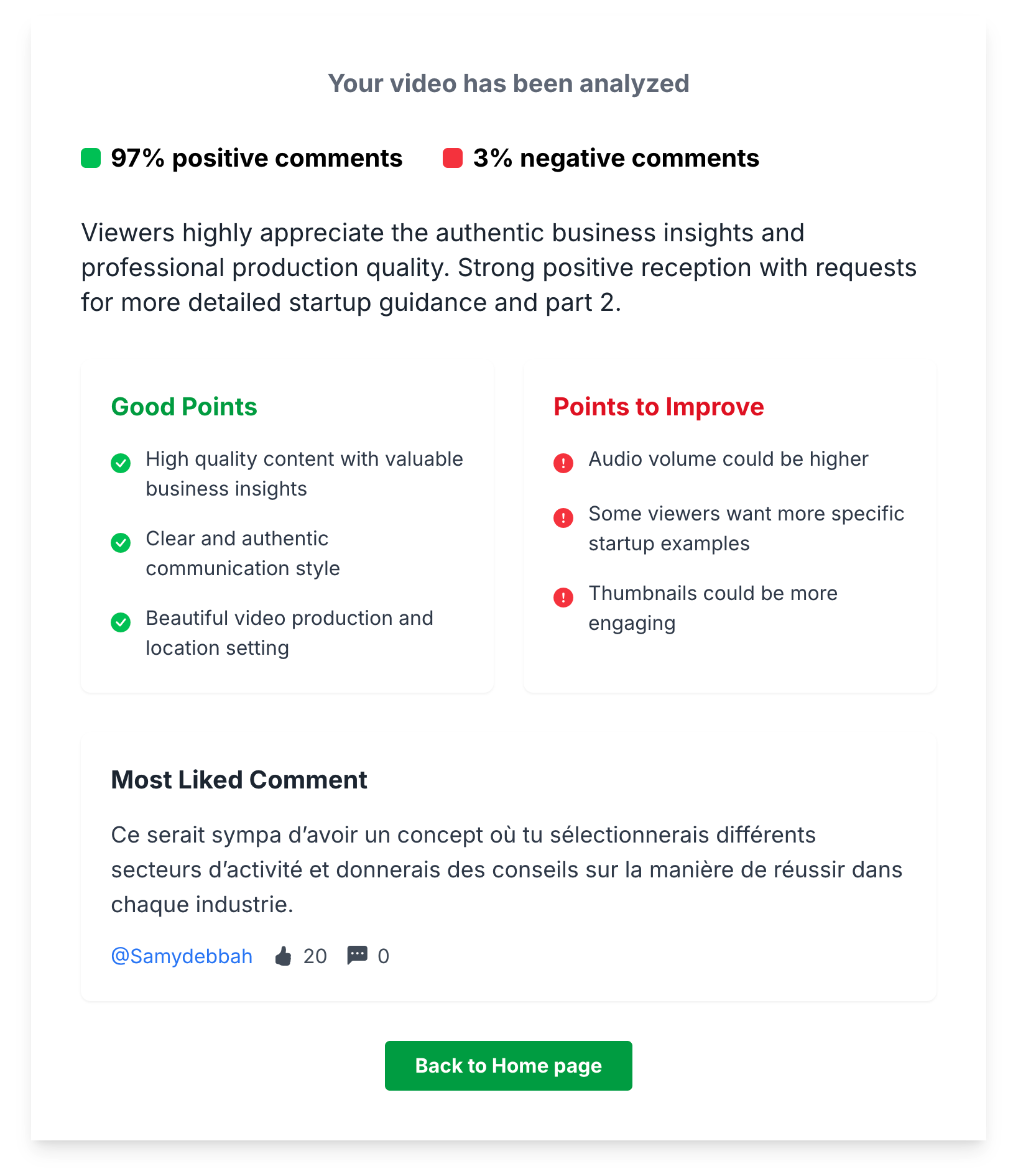
This is the highest-ROI AI use case for creators because it directly tells you what to make next. No guessing, no following trends blindly — just data from your own audience.
How Can AI Help With YouTube Keyword Research And SEO?
Tools like vidIQ and TubeBuddy offer AI-powered keyword suggestions based on search volume and competition, while ChatGPT helps brainstorm title variations.
YouTube SEO is still one of the most reliable growth channels, and AI makes keyword research faster and smarter.
Tools that actually help:
- vidIQ: AI-powered keyword suggestions based on search volume and competition. The "Keyword Inspector" feature shows you exactly what's searchable in your niche.
- TubeBuddy: Similar to vidIQ with AI-assisted tag suggestions and SEO scoring for your titles and descriptions.
- ChatGPT / Claude: Great for brainstorming title variations and descriptions. Give it your topic and ask for 10 title options optimized for search — then pick the best one and refine it yourself.
What to avoid: Don't let AI write your entire description or tags without reviewing. AI often stuffs irrelevant keywords that can hurt your relevance signals.
How Can AI Help You Test YouTube Thumbnails?
A/B testing tools like TubeBuddy's Thumbnail Test use real viewer data, while AI background removal and Midjourney help create variations faster — but always add real human faces.
Your thumbnail is the single biggest factor in click-through rate. AI can help you test more variations faster.
Tools that actually help:
- Thumbnail Test (by TubeBuddy): A/B tests your thumbnails with real viewers and tells you which performs better.
- AI background removal tools: Remove backgrounds from photos in seconds for cleaner thumbnail compositions.
- Midjourney / DALL-E: Useful for generating background elements or concept art for thumbnails, but don't use fully AI-generated thumbnails — they lack the human connection that drives clicks.
The winning approach: Use AI to generate multiple thumbnail concepts quickly, but always add your face, real expressions, and human elements. Thumbnails with real faces consistently outperform AI-generated ones.
How Can AI Help You Repurpose YouTube Content?
Opus Clip and Vizard automatically find the best clips for Shorts, Descript lets you edit video by editing text, and Whisper provides free high-quality transcription.
One YouTube video can become 10 pieces of content across platforms. AI makes this process nearly automatic.
Tools that actually help:
- Opus Clip / Vizard: Automatically find the best clips from your long-form video and format them for Shorts, TikTok, and Reels.
- Descript: AI-powered video editor that lets you edit video by editing text. Also great for removing filler words and silences automatically.
- Whisper (OpenAI): Free, high-quality transcription. Turn your videos into blog posts, newsletters, or social media threads.
Repurposing is one of the few areas where AI saves massive time without sacrificing quality, because it's reformatting your existing content rather than creating new content from scratch.
Should You Use AI To Write YouTube Scripts?
Use AI for outlines, hooks, and brainstorming — but never for writing the entire script. Your unique voice and perspective are what make viewers subscribe to you, not ChatGPT.
This is where most creators go wrong. AI can help with scripts, but it should assist, not replace.
Good uses of AI for scripts:
- Generating an outline from your topic ideas
- Suggesting hooks for your intro
- Rewriting a paragraph that doesn't flow well
- Brainstorming examples or analogies
Bad uses of AI for scripts:
- Writing the entire script from scratch
- Copying AI output without rewriting in your own voice
- Using AI to cover topics you don't actually understand
Viewers subscribe to you, not to ChatGPT. Your unique perspective, stories, and personality are what make your content worth watching. AI can help you structure and polish, but the substance must be yours.
How Can AI Help You Understand Your YouTube Audience Better?
Analyze competitor audiences with TubeFeedback, detect rising trends with Google Trends + AI, and run content gap analysis to find what you haven't covered yet.
Beyond comment analysis, AI can help you understand your audience at a deeper level.
Practical applications:
- Analyze competitor audiences: Use TubeFeedback to analyze comments on competitors' videos. What are their viewers asking for? What gaps exist that you can fill?
- Trend detection: Tools like Google Trends + AI can help you spot rising topics in your niche before they become saturated.
- Content gap analysis: Ask AI to compare your channel's topics with competitors' topics and identify what you haven't covered yet.
The creators who grow fastest in 2026 aren't the ones using AI to produce more content — they're the ones using AI to produce the right content.
Which AI Tools For YouTube Are Overhyped And Should Be Avoided?
AI voiceovers for personality channels, fully automated video creation, "algorithm hack" tools, comment bots, and mass AI-generated Shorts all do more harm than good.
Not every AI tool is worth your time or money. Here's what to avoid:
- AI voiceover tools for your main channel: Viewers connect with real voices. AI voiceovers work for faceless channels but kill engagement on personality-driven channels.
- Fully automated video creation: Tools that turn a blog post into a "video" with stock footage and AI narration. These produce bottom-tier content that YouTube won't recommend.
- "AI growth hacks": Any tool promising to "hack the algorithm" with AI is selling snake oil. The algorithm rewards good content, not technical tricks.
- AI comment bots: Automated comments on other channels are spam. YouTube detects and penalizes this. Don't do it.
- Mass AI-generated Shorts: Flooding your channel with AI-generated Shorts might get views but tanks your channel's quality signals and repels real subscribers.
What Is The Best AI Toolkit For YouTube Creators In 2026?
TubeFeedback for comment analysis, vidIQ or TubeBuddy for SEO, Opus Clip for repurposing, Descript for editing, ChatGPT for brainstorming, and Canva AI for thumbnails — all for under $50/month.
Here's the lean, no-fluff toolkit that delivers real results:
- TubeFeedback: AI comment analysis — understand what your audience wants and what competitors' audiences say. Your content strategy engine.
- vidIQ or TubeBuddy: Keyword research and SEO optimization. Pick one, not both.
- Opus Clip or Vizard: Repurpose long-form into Shorts and clips automatically.
- Descript: AI-assisted video editing — edit by text, remove filler words, clean audio.
- ChatGPT or Claude: Brainstorming, outline generation, title variations. Use as a thinking partner, not a ghostwriter.
- Canva AI: Quick thumbnail iterations with AI-powered design suggestions.
Total monthly cost: under $50 for everything. Total time saved: hours per week. That's real ROI.
How Do You Build An AI-Assisted YouTube Workflow?
Monday: research with TubeFeedback. Tuesday: outline with AI. Wednesday: film yourself. Thursday: edit with Descript. Friday: optimize with vidIQ. Saturday: repurpose with Opus Clip.
Here's a practical weekly workflow integrating AI at the right stages:
- Monday — Research: Analyze last week's video comments with TubeFeedback. Check competitor videos. Identify your next topic based on real audience demand.
- Tuesday — Outline: Use AI to generate an outline, then rewrite it in your voice. Research the topic deeply yourself.
- Wednesday — Film: No AI here. This is your creative work. Be yourself.
- Thursday — Edit: Use Descript for rough cuts and filler removal. Add pattern interrupts and B-roll manually.
- Friday — Optimize: Use vidIQ/TubeBuddy for title and tag optimization. Create 3 thumbnail variations. Write your description with AI assistance.
- Saturday — Repurpose: Run your video through Opus Clip for Shorts. Turn the transcript into a social media thread or blog post.
AI handles the tedious parts. You handle the creative parts. That's the sweet spot.
Conclusion: AI Is A Tool, Not A Strategy
The best AI tools for YouTube in 2026 don't replace creators — they amplify what good creators already do. They help you understand your audience faster, optimize your content smarter, and repurpose your work more efficiently.
Your action plan:
- Start with comment analysis — use TubeFeedback to understand what your audience actually wants.
- Add keyword research with vidIQ or TubeBuddy to capture search traffic.
- Repurpose every video into Shorts and social content with AI clipping tools.
- Use AI for brainstorming, not for replacing your creative voice.
- Skip the hype — if a tool promises magic growth, it's not real.
AI won't grow your channel for you. But used wisely, it'll help you grow faster than ever before.
