
Audience retention is the single most important metric on YouTube. It doesn't matter how many people click on your video if they all leave after 30 seconds.
In this guide, we'll break down why viewers drop off, how to diagnose retention problems, and concrete fixes you can apply to your next video.
Audience retention measures the percentage of your video viewers watch. Higher retention means more algorithmic promotion, more watch time, and more subscribers.
Audience retention measures the percentage of your video that viewers watch. If your 10-minute video has 50% retention, the average viewer watches 5 minutes.
Why does YouTube care so much about this?
A video with 100,000 views and 30% retention will grow your channel slower than a video with 20,000 views and 70% retention. YouTube rewards engagement depth, not just clicks.
Go to YouTube Studio > Analytics > Engagement to see a curve showing exactly where viewers stay and where they leave your video.
Go to YouTube Studio, click on any video, then navigate to the Analytics > Engagement tab. You'll see a curve that shows exactly where viewers stay and where they leave.
Here's how to read it:
Slow intros, thumbnail/title mismatch, dead air, no structure, bad audio, content/audience mismatch, and videos that are too long without payoff.
1. Slow or misleading intros
If your first 15 seconds don't deliver on the promise of your title and thumbnail, viewers are gone. Long intros with "Hey guys, welcome back to my channel..." lose people instantly. Get to the point.
2. Thumbnail/title mismatch
If your thumbnail promises a dramatic reveal but your video is a slow tutorial, viewers feel tricked. High CTR + low retention = clickbait, and YouTube will stop promoting your video.
3. Dead air and filler
Unnecessary pauses, repetitive explanations, or "umm" moments kill momentum. Every second should earn its place in the video.
4. No structure or pacing
Videos without clear segments or progression feel directionless. Viewers need to feel like they're moving toward something — a payoff, an answer, a conclusion.
5. Bad audio quality
Viewers tolerate average video quality but they won't tolerate bad audio. Echo, background noise, or inconsistent volume levels drive people away fast.
6. Content doesn't match the audience
Sometimes the problem isn't your video — it's that you're attracting the wrong viewers. If your title targets beginners but your content assumes advanced knowledge, there's a mismatch.
7. Too long without payoff
Longer videos can work great, but only if every minute delivers value. Padding a 5-minute topic into a 20-minute video will tank your retention.
Start with the problem, show the result first, cut all fluff, and match the energy of your thumbnail — the first 30 seconds determine if viewers stay.
The first 30 seconds determine whether viewers stay or leave. Here's what works:
Comments like "I skipped to 5:30" or "the intro was too long" are direct retention feedback — AI tools like TubeFeedback surface these patterns automatically.
Your viewers often tell you exactly where and why they dropped off — if you know where to look.
Comments like "I skipped to 5:30", "got bored halfway through", or "the intro was too long" are direct retention feedback. The problem is finding these signals among hundreds of comments.
TubeFeedback can help. By analyzing your comment section with AI, it surfaces recurring complaints and suggestions that directly relate to retention:
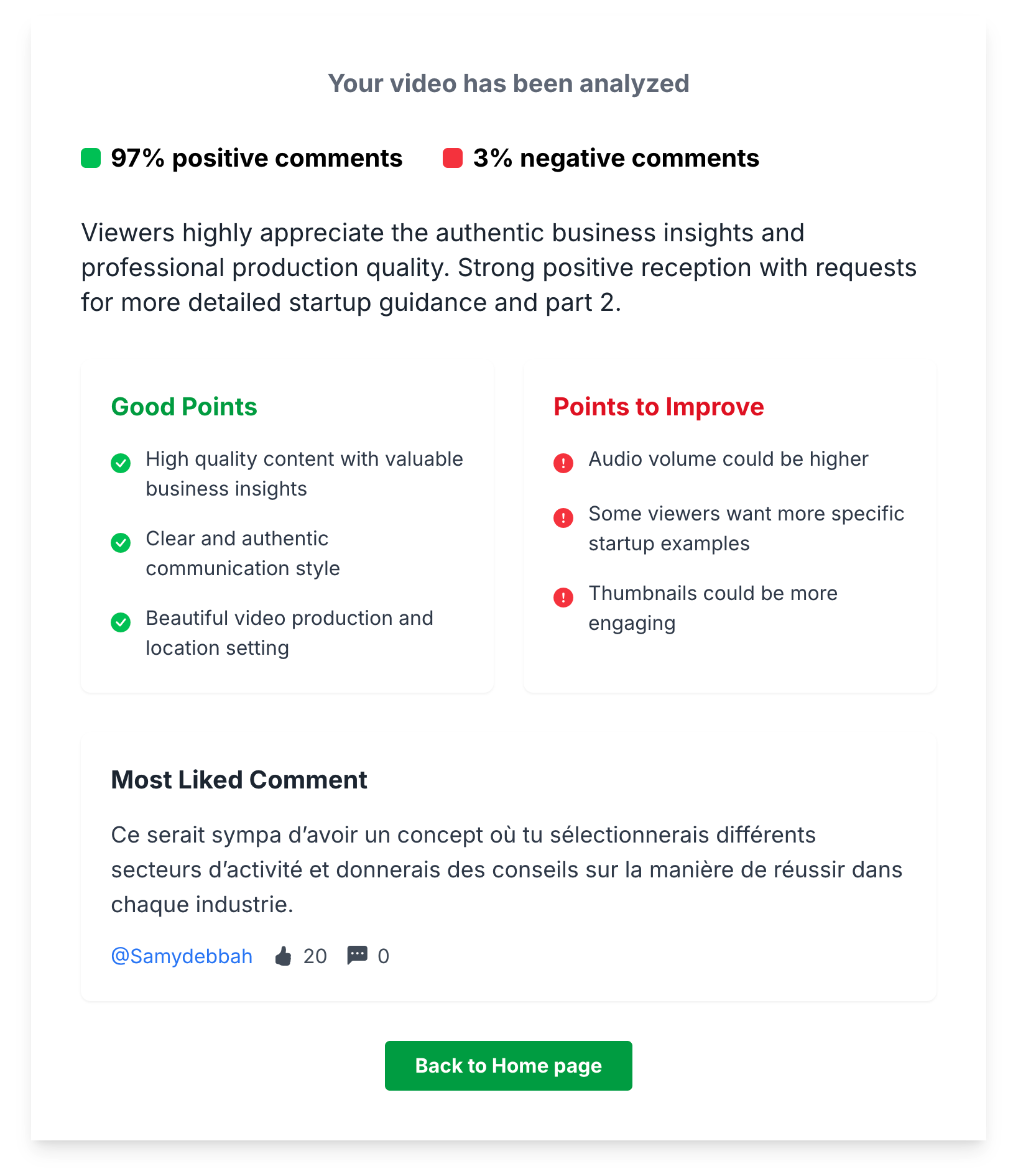
Combine this with your retention graph and you get a complete picture: the graph shows you where they leave, the comments tell you why.
Pattern interrupts every 5-10 seconds, ruthless cutting, visual progress cues, open loops, and varied pacing are proven techniques.
Great retention starts in the edit. Here are proven techniques:
Under 5 minutes: 60-70%. 5-10 minutes: 50-60%. 10-20 minutes: 40-50%. 20+ minutes: 35-45%. The trend matters more than the absolute number.
There's no universal "good" number because it depends on video length and niche. But here are rough benchmarks:
More important than the absolute number is the trend. Are your retention rates improving video over video? That's what matters.
Compare your top 5 vs. bottom 5 videos by retention, analyze what differs in intros, structure, and pacing, and use comment sentiment analysis to understand why.
Your best retention insights come from comparing your own videos. Look at:
This is the fastest way to identify what your specific audience responds to, rather than following generic advice.
Promising without delivering, ignoring the retention graph, optimizing only for clicks, and padding videos for length are the most damaging errors.
Views get you noticed. Retention gets you recommended. Every percentage point of retention you gain compounds into more watch time, more impressions, and more subscribers.
Your action plan:
The creators who master retention are the ones who grow. Start treating every second of your video like it matters — because to the algorithm, it does.
